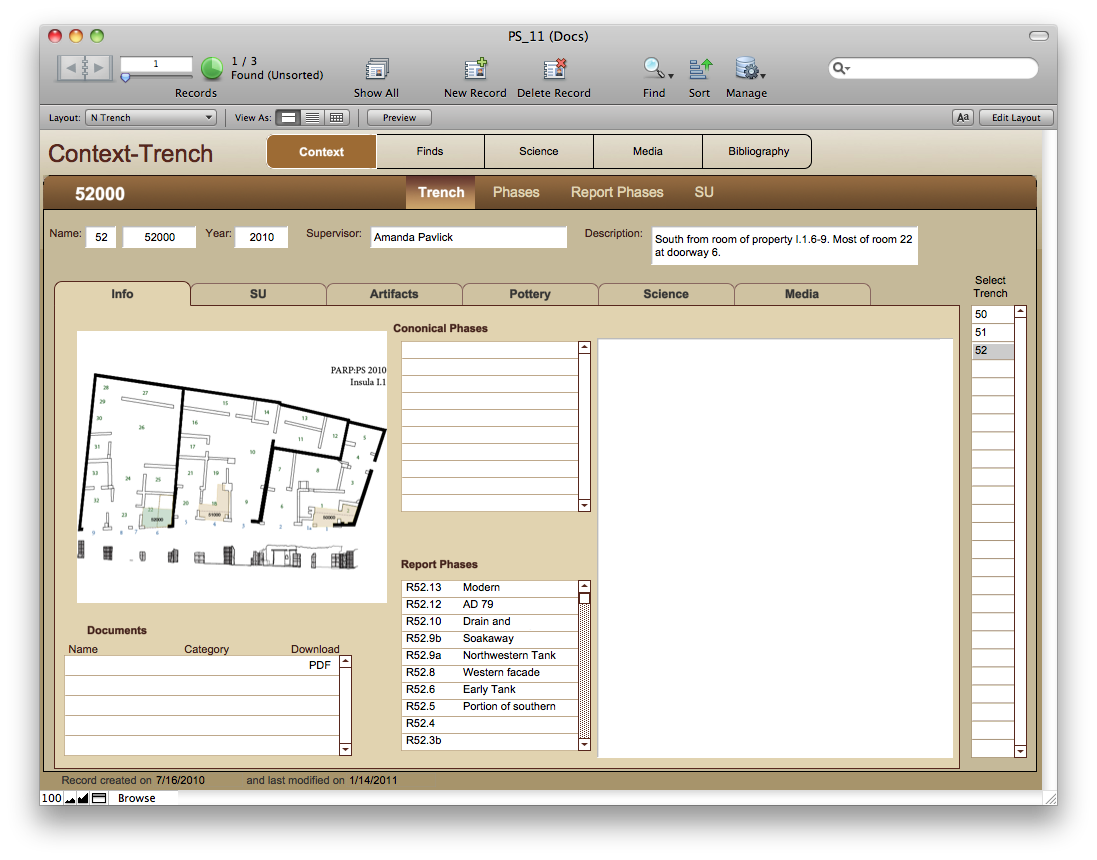
Before I can talk about putting the database on a tablet I want to show you what the full PARP:PS database looks like, and a little bit about why it looks that way.

Like most field projects the database of PARP:PS is built to reflect the reality of the excavation workflow. For instance: almost all of the work that we do, from excavation to initial pottery processing, wet sieving, and artifact registration is all done at the same place. Since we don’t have to move bags of artifacts and samples from the site to a different location for processing, we don’t have a bag inventory system. That is reflected in the database: we simply have contexts and finds and don’t track bag numbers.

The pottery is initially cleaned and read by the excavators, with some ceramicists approving the reading. The initial reading is a simple classification of the material into 23 classes (seen on top of the Pot Quant Entry layout). The ceramic experts normally do not show up until the excavation is over. Since what they are doing is an entirely separate read, I can’t split the quantified material from one class to another. So I have an entirely separate table named Ceramic Details to hold that information.

We have two different phasing categories: report phases and canonical phases. Report phases are the initial phasing in the field. By the time we have examined them for publication we might have reassigned several SUs from one phase to another and that becomes the canonical phase (or simply phase).

The rest of the database should be fairly familiar to anyone that has worked on excavation databases before.

Right now the database houses information on contexts at the trench and SU levels. It has all of the finds, and the roughly quantified pottery. The detailed ceramic info isn’t quite finished as I haven’t yet finished working with the ceramicists to get it to their liking. The database also contains information from the science team, in the form of a list of samples that have been examined and detailed faunal information (developed with Emily Holt). We don’t yet have floral information. We track the conservation done to our artifacts. We have a fairly advanced media data table which is integrated into all other areas of the database.

The Context layouts summarize the data from the other parts of the database. There is a navigation aid on the right which allows you to move from trench to trench without doing additional searches. This aid also appears on the SU layouts. Read the rest of this entry »

An article written by Billur Tekkok, Sebastian Heath and myself is about to appear in Studia Troica. They have kindly allowed us to host a pre-print version of the article.

The authors present a non-technical overview of the database structures that record information about the Post-Bronze Age ceramic assemblage at ilion. its purpose is not to fully document the system used at troia, but instead to identify practices that can be useful in other contexts. The article particularly stresses that it is important to assign a primary identity to all sherds that will be subject to individual study and that this identity can be re-used in such record keeping processes as drawing and photography. further use of such identities in print and digital publication is likely to make online linking of ceramic data to contextual information easier in the future.

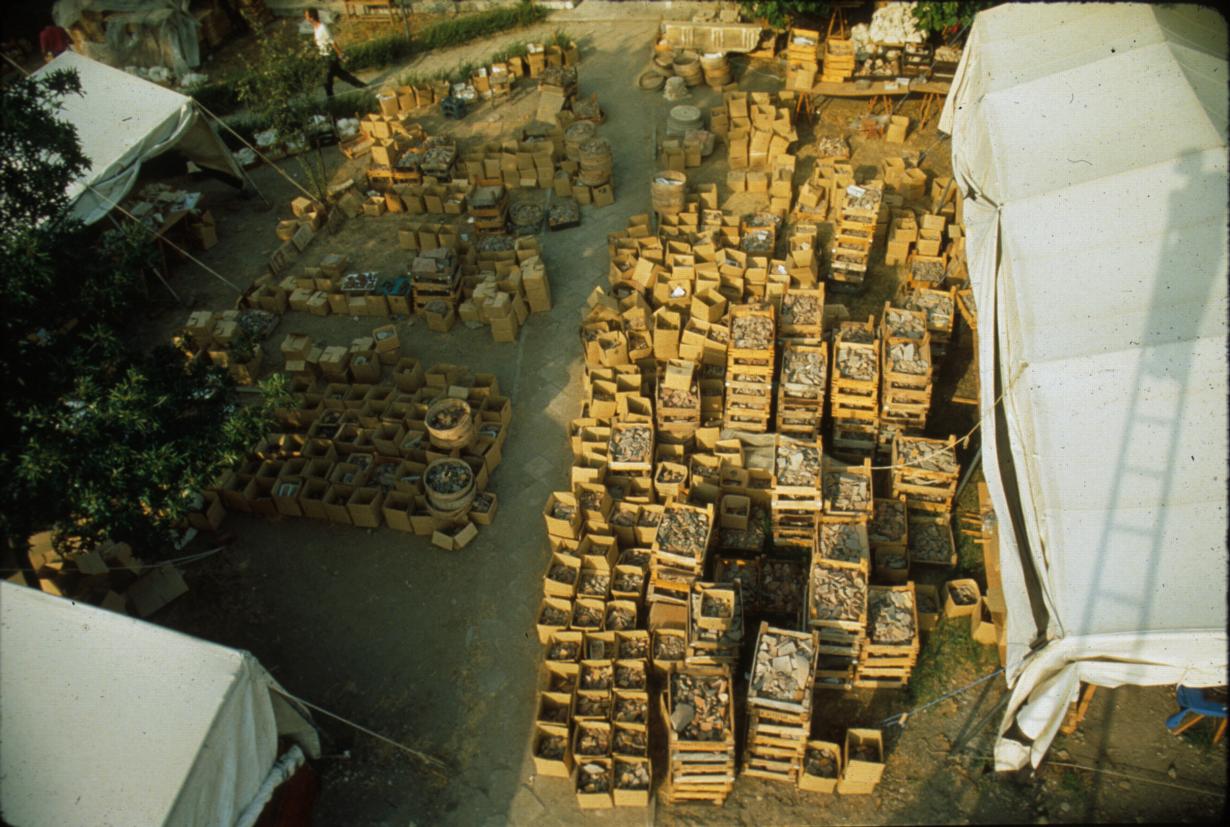
This article describes our method for recording what was a truly staggering amount of pottery, even for an urban site. And this post gives me the opportunity to show one of my favorite pictures of Troy:

This is the area in front of the dig house at Troy. The vertical sidewalk in the photo separates the Bronze Age team ceramic processing tent on the left from the Post Bronze Age team ceramic processing on the right. Keep in mind that this is pottery from the current year only, waiting to be processed. The tent itself is full of tables with pottery spread out for analysis.

The Troy database is probably more similar to data collection schemes found in Greece than the work that I am posting based on the Pompeii data. Since our PARP:PS pottery is not read for publication until after the project is complete, I haven’t had to add tables to find all of the associated drawings of a piece. Another difference is how the individual numbers are assigned. The Troy database would hand out the next unique individual sherd numbers to the scholar. At Pompeii the scholars will come and study the ceramics during the winter when we are not there. So I have to devise a way for someone to assign a number to a ceramic without the possibility of duplication. We have a procedure in place but it is relatively untested.

Bill Caraher in his New Archaeology of the Mediterranean World blog has mentioned this blog frequently. Lately he has pondered what to do about his participation in a larger field project in the Princeton Polis Expedition. More specifically, he is trying to address how much his small study group should invest in its own data structure which may or may not be compatible with the data set of the project as a whole.

“I have been diligently reading John Walrodt’s Paperless Archaeology over the past few weeks. This blog documents in detail how a project implemented their digital workflow. From what I have seen so far, the tools that they developed and deployed served to facilitate their ongoing, in the field, research (although I am sure that there are provisions for archiving the data in a responsible way).”

He is correct, of course, in that this blog is currently focused on ongoing field research. There are things to say about data repositories, but I haven’t gotten there yet. My main focus on PARP:PS is data collection and immediate consumption and analysis of that data for preliminary publication.

It might help to realize that there are two different things at play: datasets and databases. I create databases to manage my datasets. The datasets might vary slightly from project to project and region to region, but are fairly interoperable. The variation that does exist is primarily a reflection of the variation that you get in survey/excavation/finds processing techniques from project to project. I can export the contents of any of the databases that I manage into a few dozen or so tables (PARP:PS currently has 35 tables) that can be key-linked using any database tool available.

But the database itself in its current FileMaker form does much more than store the data. We use it to view and summarize the data in a number of different ways. We can view all material from an single SU (Stratigraphic Unit), from a single phase (what Bill refers to as “level” in the Princeton Polis project), or a whole trench. Since we also have defined rooms and properties, we can add those to the database and view everything in those contexts as well. The database imports the images and creates the find numbers that we use to avoid data entry mistakes, and has validation routines to verify that hand-entered data is correct.

To put it another way: while my database might not be useful for many projects other than PARP:PS, I am pretty certain that my dataset will be useful for comparison to other projects at Pompeii or in Italy in general.

Getting back to Bill’s dilemma. His two options, as he expressed them, are to “develop a data structure best suited to answer our immediate research questions…On the other hand, I could imagine a data structure (undoubtedly more complex) best suited to preparing the Polis data for some form of digital publication (or at least archival storage).  Few projects in the Eastern Mediterranean with a Byzantine focus have made their data publicly available. In this regard, the Polis data could be an important step toward making stratigraphic, typological, and chronological data from the Byzantine period available in digital form.  At the same time,the two Early Christian churches represent just one part of a much larger and more complex site. Taking the time to produce a thorough and well-structured dataset could be a fool’s errand if it ends up being incompatible with other work ongoing at the site or finds very few comparable datasets elsewhere in the region.”

From my perspective this is an easy decision to make, although I haven’t seen any of the data. The more attention given to the structure of the data set is directly related to your ability to use distinct parts of that data set for analysis. It is my experience in fieldwork that inelegant solutions (Bill’s term) exist because no one has spent a great deal of time and energy to produce a more elegant one. Sometimes a project is looking for someone like Bill to show them the benefits of a better designed data structure. I have been on both sides of that conversation: I have created data structures that have been adopted by the larger project and I have incorporated data structures that others want to use in my own. I find that they key is to prove the benefits of the new solution and the conclusion becomes obvious. The issue of comparable datasets outside of the project isn’t, of course, Bill’s problem. If he is the first one to make such a tool available, and he publishes his data structure, it is up to those following him to try to make their data comparable.

Much of this is to say that I am shifting to posting about databases for the next few weeks. I will post a clone of the PARP:PS database in its current form (it is, of course, unfinished) as well as the files necessary to put the database on an iPad using FMTouch. The database is a complex beast and I don’t expect people to understand it right away, but I do plan on a series of posts explaining parts of the database in more detail.
Remember that the reason we used iDraw for scaled drawings at PARP:PS is because the trench supervisors were used to that workflow. They have the skills to make good scaled drawings and they do them rather quickly. We didn’t want to introduce too much change all at once. Having them conquer vector drawing and learn how to draw with their fingers on a tablet was enough.

But it wasn’t the most efficient workflow. It still involved moving data from the tablet to the CAD environment and vice versa. What we really want to do is to have the tablet drawing directly to the spatial environment. If we can get both the total station speaking to the iPad and a true CAD environment, that would be close to ideal.

We are making baby steps. Autodesk came out with AutoCAD WS. We have loaded our CAD drawings from this past summer to the AutoCAD website and are evaluating the use of this software for the next season. AutoCAD WS came out this past fall but only offered online editing. Since we use our iPads offline this was less than useful. But the new version, updated in December 2010, offers offline editing.

We would like for the software to support 3D but for now are stuck in a 2D drawing environment with AutoCAD WS. This can be both a good thing and a bad thing. Bad in that we want 3D data, but good in that the trench supervisors would have a much greater learning curve with 3D drawing than with 2D drawing, and we can avoid that for now.

The total station data is another beast. I know that the Athenian Agora uses hand-held computers (Palm pilots, see Richard Anderson’s and Bruce Hartzler’s chapters in The Athenian Agora: New Perspectives on an Ancient Site, ASCSA 2009) to get points directly from their total station but I don’t know of any total station company that is preparing to introduce an iOS (or Android) app for direct communication from the total station to a phone/tablet device.

Even if there was a bluetooth capable total station there isn’t necessarily a path to a visual display of the data. The old way of doing this was to have ArcGIS Mobile (or ArcPad) running on a Windows Mobile device (up to version 6.5) or on a Windows tablet with software provided by the total station or GPS manufacturer (such as Trimble Pathfinder and/or GPSCorrect). So half of the solution was created by ESRI and the other half by the total station company.

Hopefully with the new tablet technology this kind of software architecture can be made to work again. ESRI does have an ArcGIS app for the iOS and Windows Phone 7 (with Android support promised later this year). The ArcGIS app will allow rudimentary data collection, but it is limited to adding points either by sight or by the phone’s GPS signal. There is no way to import points or to draw polylines or polygons.

Let’s hope that ESRI or Autodesk does step up with an enhanced app with an API that will allow total station manufacturers the ability to use it for importing and displaying point data. I would pay money for that.

The previous iDraw exercises paid no attention to scale, they were focused on gaining familiarity with the concept basic technical drawing skills. When you try to draw original items on the ground, you need better scaling and layer controls.

PARP:PS has always drawn at 1:20 scale. Since the original iDraw only used pixels for the units, we had to create a scale bar that made logical sense to the user and draw things in an artificial scale. But now that we can use different units in iDraw we can have a better sense of size when we draw.

We also had to arrive at a logical layer structure. Being able to turn layers on and off is key to moving elements out of your way to focus on the drawing. So our drawings used the following layer structure:

  • Elev Text
  • Elevations
  • SU Text
  • SU
  • Walls
  • Tr Outline
  • Baselines
  • Scale Bar
  • Image

This layer structure, and the major grid lines standardized on 5 instead of 6, can be copied to your computer using the instructions below. The file that you download and install will be an A-3 sized document with millimeter sized grids.

iDraw documents are packages. That is, it is really a folder, but your iPad thinks it is a document. The problem is that when you copy native iDraw documents to the Mac, the Mac doesn’t see it as a package, but as a folder. And it will copy the document over to the iPad as a folder, and iDraw won’t recognize it as a document. The trick is to make the Mac think it is a package, then copy it over, and then rename it in iTunes. So the file that I made has a .pkg extension, making it look like an installer package. Download the file here, which will start as a .zip file. Once decompressed it will be called GridA3.pkg (and the Installer might try to install it but return an error which can be dismissed). Using the file sharing feature of iTunes, copy the GridA3.pkg file to iDraw. While still in iTunes, rename the file GridA3.idraw. Close and re-open iDraw and you will see the new file. Duplicate that document to have the scaled five line grid system and the pre-defined layers.

As you draw, you will often see a rectangle with the dimensions of the object near your finger. If you are used to doing scaled drawings at all it will soon become easy to translate those cm dimensions on the screen to cm dimensions on the ground. Multiply the number on the screen by 20 to get the ground measurement. This allows you to draw triangulation lines corresponding to tape measurements to properly place objects.

A bonus to using the A3 sized document to practice with is that you can import the drawings from the previous exercises and, since they were scanned at 100% scale, they will be properly scaled on the iDraw drawing.

Here are a couple of finished drawings from the 2009 season of PARP:PS:

51000 Plan 27

52000 Plan 9 Final